
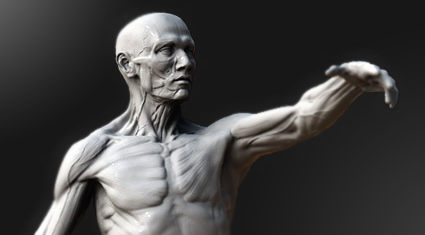
Yeah, im going to London on Artistic Anatomy Masterclass with the great artist Scott Eaton.
I really looking forward to this. Think it will be very inspiring and I will probably learn a lot :-)
He is fantastic with Zbrush and a master of anatomy!
Please let me now if you also are joining :-)
Showing posts with label ZBrush. Show all posts
Showing posts with label ZBrush. Show all posts
Thursday, January 22, 2009
Artistic Anatomy Masterclass on 2-3 April 2009 with Scott Eaton

Friday, February 29, 2008
Friday Night Sculpt #3 - Demon

Its friday :-) Time for some Friday Night Sculpting over at 3dhue.com.
This time the theme was Demon.
Here is my result after 2h.
Saturday, February 23, 2008
More ZBrush doooodles!

Time for another head done in ZBrush, just love that program!
This time an African man...
Friday, February 22, 2008
My daughter - 6months!!!

The time goes so fast! My daughter is already 6 months!
So as a little "birthday" present, I did a quick sculpt today.
Friday Night Sculpts #2 - Robot

Hi, Fridah Night Sculpting day over at 3dhue.com. The theme this week was Robot head. Did this quick 1 hour speed sculpt of a half human and half robot.
I started out with the provided Ztool, just a very simple base head. After some quick sculpting of the foundation on the head, I masked out the different "metal" parts, and extracted them as new subtools.
Was fun to do some "hard" surface sculpting in ZBrush. Haven't done that to much. I think I will try to do it more often. Was fun!
Wednesday, February 20, 2008
Gnomonology - New releases!

I bought two of Rick Bakers timelapses from Gnomonology yesterday.
After spending 5 hours watching them, I must say they are great inspiration. Its supernice to watch how Acadamy award winner Rick Baker works!
So I strongly recommend to buy this timelapses:
The Biker - Rick Baker
African Woman - Rick Baker
Friday, February 15, 2008
Friday Night Sculpts

So its Friday! Joined the Friday Night Sculpts over at 3dhue.com today. They post a theme, and we have 2hours to finish something. Today it was Alien.
We finally got the keys to our new apartment today :) So this weekend is going to be a color full weekend with painting :)
Wednesday, February 13, 2008
ZBrush doodle

Long time since I posted something in my blog, so I'm uploading a quick sculpt I did tonight for fun.
The texture is also done in ZBrush...
I have now finished my last real job over at Modul Interactive, redesign the Think.no site (cooming out soon) so now I'm closer to take the step to Hyperlinkto... This is why I haven't had time to post something here :)
Have already helped them with 5 characters for a game for Byggmakker.
My girlfriend, my daughter and me are moving to a bigger apartment this Friday, supernice!
Just have to sell our old one :) Give me a call if you are looking for a 70m2, one bedroom, with a nice view on the balcony in Oslo, Norway :)
Saturday, January 19, 2008
ZBrush Time lapse- Head Speed Sculpting
 Did some speed sculpting today. Recorded a timelapse of the prosess of creating this head from a basic mesh to the finished result.
Here is the time lapse:
Friday, January 18, 2008
Speedsculpting - ZBrush & Maya

I did this Ant for a speed modeling comp on a 3dhue.com. We had to sculpt a Bug within 90min.
So this is my result. Basemodell in Maya, detailing in Zbrush.
I would like to finish this up with textures and some more fine details, but this was what i delivered for the comp.
Saturday, January 12, 2008
ZBrush - Detailing my character

Started detailing my character today. This is the part I love.. just bringing everything togheter.. Still a lot left, but posting a quick update here...
Friday, January 11, 2008
ZBrush Topology tool
 Finished with week 4. And here is my result with the topology tool in ZBrush. This tool is one of the best in ZBrush 3.1. I'm now ready for the fine details, and I'm also going to lay out my UV´s this week.
Here is a small guide on how to use the topology tool in ZBrush 3.1:
1) Go to "3d edit" mode on your model
2) Draw out an ZSphere from the Tool menu on to the canvas.
3) Go under the Tool menu, here you now see a section called "Rigging". Press "Select" and select the model you want to create new topology on.
4) In the Tool menu, there is also a section called "Topology". Press the "Edit topology" button.
Your are now ready to draw out new topology on your model.
Good luck!
Sunday, January 6, 2008
ZBrush Sculpting Digital Characters Week 4 - CGWorkshops

We have had two weeks of now in the Holiday Breaks, so it's time to finish up my week 4 homework in the ZBrush Sculpting Digital Characters course/workshop I'm taking over at CGSociety.org. Here is a link to the course details.
This is a 8 weeks course in creating digital characters in ZBrush. We also look into anatomy and the philosophy and ethics of the production world.
Our instructor is Cesar Decol Jr. He is a Modeling Supervisor and TD. Cesar Dacol Jr. has worked on films such as Journey 3-D, 300, Barnyard, The Wild and Fantastic Four.
Week 4 was about refining our character and do some retopology with the fantastic topology tool in ZBrush 3.1. If you haven't checked it out, do it now! It's just super nice!
We have created our characters from ZSpheres, so I had to do some cleaning up in my topology.
In the next week we will start with the fine details on our character. The weeks until week 5, we have focused on the foundations. Bones & muscles.
After the course is finished, I will add some accessories and cloths to him. The reason I'm not adding it now, is because we focus a lot on the anatomy and foundation.
Looking forward to texturing and pose him... will post some updates... so stay tuned :)
Subscribe to:
Posts (Atom)

